Banner
Showing posts with label PowerPoint PPT fan love. Show all posts

Tuesday, July 21, 2009

Free Solar Eclipse Backgrounds Download

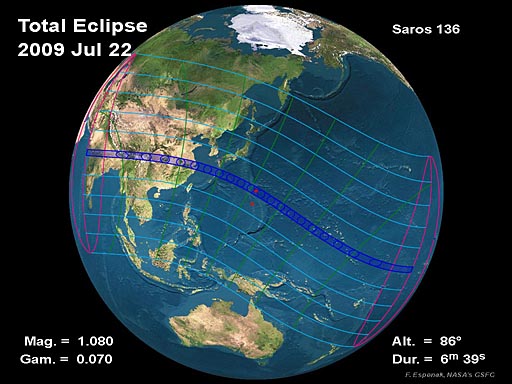
Total Solar Eclipse of 2009 July 22

On Wednesday, 2009 July 22, a total eclipse of the Sun is visible from within a narrow corridor that traverses half of Earth. The path of the Moon's umbral shadow begins in India and crosses through Nepal, Bangladesh, Bhutan, Myanmar and China. After leaving mainland Asia, the path crosses Japan's Ryukyu Islands and curves southeast through the Pacific Ocean where the maximum duration of totality reaches 6 min 39 s. A partial eclipse is seen within the much broader path of the Moon's penumbral shadow, which includes most of eastern Asia, Indonesia, and the Pacific Ocean.

2009 Total Solar Eclipse Global Map
Click to enlarge.

Here are some powerpoint backgrounds on Solar Eclipse I collected on web:

Free Solar Eclipse Background 1


Free Solar Eclipse Background 2


Free Solar Eclipse Background 3


Free Solar Eclipse Background 4


Free Solar Eclipse Background 5


Free Solar Eclipse Background 6


Free Solar Eclipse Background 7


Free Solar Eclipse Background 8


Free Solar Eclipse Background 9


More free PowerPoint backgrounds can be found at http://www.dvd-ppt-slideshow.com/powerpoint-background/

Monday, July 20, 2009

Play PowerPoint on Your iPod ,Cool !

As we know, iPod can only play video formats like .MPEG-4, .mp4, .avi.Actually, it’s possible and very easy. With the help of the third-party software, you can easy convert your PowerPoint to .MPEG-4, .mp4, .avi within only 3 steps:

Step 1: Insert your PowerPoint.

Step 2: Set the Output formats

Step 3: Convert.

Moyea PPT to Video Converter is one of such converters, it enables you to convert PPT to AVI, WMV, MPEG, FLV, MP4, VOB, 3GP/3G2, MOV, etc. Moreover, it brings no distortion, asynchronization nor a slight loss of PowerPoint effects to any output video.

Since now, you can share your wonderful PowerPoint with your friend and family with only a small iPod, isn’t this cool, why not have a try?


Related:

PowerPoint to DVD PowerPoint to Video PowerPoint to FLV

PowerPoint to DVD for Education PowerPoint to Video for Education

PowerPoint for Web PowerPoint to PDF PowerPoint to DVD Burner

Convert PowerPoint to Video PowerPoint to DVD Converter

Thursday, July 16, 2009

Convert PowerPoint to DVD for Children Teaching

Convert PowerPoint to DVD for Children Teaching

Make some powerpoint presentations for children teaching, then convert the powerpoint to dvd and play it on DVD player, let your children enjoy your teaching all day.

"From birth, parents must choose toys and learning tools for their child that are fun and enjoyable to play with and that also foster sensorial growth to ensure a more complete development process," says Dr. Kathleen Alfano, leading child Researcher and Director of the Fisher-Price Child Research Department. Therefore, when there are thousands of toys and learning tools for our parents to choose for the children's development, what is the best tool that would foster your children's sensorial growth? And what should we rely on to increase their sight and sound experiences? -The answer is PowerPoint to DVD Burner

E-learning for Today's children

Moyea PPT to DVD Burner would be surely a good choice for your children, as it is a professional tool designed to convert PowerPoint presentations to DVD video files for wider sharing and distribution with much enhanced pleasure and attraction, which would be much suitable for our children; and PowerPoint is currently the most fashion method in education field. The more detailed advantages of using Moyea PPT to DVD Burner for your children teaching would like to be listed as follows:

  • Benefits from the functions Moyea PPT to DVD Burner:

View your PPT on DVD and TV

1. Generate DVD disc directly from PowerPoint
2. Convert PowerPoint to video file in MPEG format
3. Retain original music, flash, movie clips in source PPT
4. Insert any background music you like to the output
5. Record your own narration as the introduction or explanation for the output and your children
6. Custom DVD menu like add text and background image to navigate and attract your children's attention
7. Create DVD image file like ISO file for the third-part burn program to record DVD disc

  • Benefits from the operation of Moyea PPT to DVD Burner:

Easier use and faster conversion obtain much more efficient work

1. User friendly interface let you enjoy the course of operation
2. Easy-to-use operation let every parents become the hero in front of your children
3. Fast conversion let you patience is no longer a problem
4. Flexible output settings for different screen size to meet specific needs
5. Batch conversion supported let your spare time still enough

  • Benefits from the effect of Moyea PPT to DVD Burner:

Clearer audio and clearer video achieve much teaching effects

1. The output has excellent clear audio and video, let alone the problem of audio and video synchronization, audio distort, then your teaching efficient will be automatically and naturally increased a lot.
2. The animation output viewed on DVD Player or TV will largely attract your children's attention and interest, then let your teaching and your children's learning no longer boring.
3. The generated DVD disc with your presentation can be distributed more convenient, and share your great work with your families and more of your friends and students.

All in all, when PowerPoint has become the main method in the educational field, and DVD and TV becomes the most fashionable visual enjoyment tool for people currently, why not we naturally expect the effect would be much better if these two elements are perfectly matched? And why not we think PowerPoint to DVD burner is a wise decision?


Related:

PowerPoint to DVD PowerPoint to Video PowerPoint to FLV

PowerPoint to DVD for Education PowerPoint to Video for Education

PowerPoint for Web PowerPoint to PDF PowerPoint to DVD Burner

Convert PowerPoint to Video PowerPoint to DVD Converter

Wednesday, July 15, 2009

Upload PowerPoint Presentation to YouTube

When you made a admirable PowerPoint presentation, and would like to upload it to YouTube to share with others. YouTube accepts video files from most digital cameras, camcorders, and cell phones in the WMV, AVI, MOV, and MPEG file formats. But PowerPoint presentations are not video formats and Microsoft itself also doesn't support the conversion. How to resolve this problem? Here I'll show you two ways to upload PowerPoint to YouTube.

1. Use Windows movie maker that included in your Windows machine (see how to import PowerPoint to Windows movie maker). It can help you make beautiful slideshow or video clip (e.g. mixing your songs with pictures/video/lyrics/etc), then save it as video file such as wmv.

Or just get those clips you want, save & convert them, and then mix/match with pix/sound/etc using Windows movie maker to create new masterpieces.

When the output video comes out, you can upload it to YouTube.

2. Use third party software to convert PowerPoint to YouTube support video. Moyea PPT4Web Converter is the right tool to help you easily convert your PowerPoint presentations to stunning videos. With it, you won't lose any voice, movies, animations and transitions in the original PowerPoint. The video converted should retain all the subtitles in the PowerPoint.

With only 3 clicks, you can convert PowerPoint presentations to video formats such as MPEG, AVI, MP4, WMV, MOV and 3GP with excellent quality.

Step of how to do it:
1. Install Moyea PPT4Web Converter.
2. Run it and then click Import to load the PowerPoint presentations you want to convert.
3. Set the output format.
4.Start the PowerPoint to Youtube video conversion process.

Minutes later, you get the converted video and can upload it to YouTube.


Related:

PowerPoint to DVD PowerPoint to Video PowerPoint to FLV

PowerPoint to DVD for Education PowerPoint to Video for Education

PowerPoint for Web PowerPoint to PDF PowerPoint to DVD Burner

Convert PowerPoint to Video PowerPoint to DVD Converter