Banner
Showing posts with label audio. Show all posts

Thursday, November 5, 2009

PowerPoint's Likes on Audio and Video Formats

Comfort and convenience are what in current computer technology. With computer-riding multimedia converters (e.g. Moyea PPT to Video Converter) or screen recorders (like Camtasia Studio), it is duck soup for you to transform a PowerPoint presentation to distinct video and extract or convert a favored sound from PowerPoint to a desired audio format. Nevertheless, when trying to put a song or a video clip to your PowerPoint presentation, you may strike a snag - The sound can’t be recognized by PowerPoint!The video clip shows no graphics! What is the problem? You are probably inserting a song or video with improper file format to the PowerPoint.

To solve the problem of format incompatibility, you should know what multimedia formats can be applied to your PowerPoint. You will not be able to play the song or video in your presentation unless converting it to a PowerPoint-supported file format. Below lists all multimedia formats that you can use in MS PowerPoint, categorized by audio and video. Have a quick browse to see whether yours is included.

Add audio and video files to PowerPoint

Audio File Formats Compatible with PowerPoint

  • AIFF Audio file (*.aiff): Audio Interchange File Format
    A sound format originally used on Apple and Silicon Graphics (SGI) computers. Waveform files are stored in an 8-bit monaural (mono or one channel) format that is not compressed and can result in large files.
  • AU Audio file (*.au): UNIX Audio
    Often used to create sound files for UNIX computers or the Web
  • MIDI file (*.mid or *.midi): Musical Instrument Digital Interface
    A standard format for the interchange of musical information between musical instruments, synthesizers, and computers
  • MP3 Audio file (*.mp3): MPEG Audio Layer 3
    A faddy digital audio encoding format of lossy data compression, used for consumer audio storage and the transfer and playback of music on digital audio players
  • Windows Audio file (*.wav): Wave Form
    An audio file format that stores sounds as waveforms. Depending on various factors, one minute of sound can occupy as little as 644 kilobytes or as much as 27 megabytes of storage.
  • Windows Media Audio file (*.wma): Windows Media Audio
    A sound file compressed by the Microsoft Windows Media Audio codec, a digital audio coding scheme developed by Microsoft that is used to distribute recorded music, usually over the Internet.
  • Video File Formats Compatible with PowerPoint

  • Windows Media file (*.asf): Advanced Streaming Format
    A file format that stores synchronized multimedia data and can be used to stream audio and video content, images, and script commands over a network.
  • Windows Video file (*.avi): Audio Video Interleave
    One of the most popular multimedia file formats for storing sound and moving pictures in Microsoft Resource Interchange File Format (RIFF) format. The AVI format has audio or video content compressed with a wide variety of codecs.
  • Movie file (*.mpg or *.mpeg): Moving Picture Experts Group
    This is an evolving set of standards for video and audio compression developed by the Moving Picture Experts Group. This file format was designed specifically for use with Video-CD and CD-i media.
  • Windows Media Video file (*.wmv): Windows Media Video
    This file format compresses audio and video by using the Windows Media Video codec, a tightly compressed format that requires a minimal amount of storage space on your computer’s hard disk.
  • Got it? If your sound or video insert is not listed above, convert it to a supported file format by using some third-party conversion programs or utilities. For instance, the free online Media Converter, standalone Leawo Free Video Converter, etc.

    Note: Your sound or video insert may not work in PowerPoint if you haven’t installed the right codec or if the file codecs are not recognized by your OS, even if you have the same file format as one listed above.

    Monday, September 7, 2009

    PowerPoint Tips:Background Music Setting

    Summary: This is a tutorial on how to insert audio file into PowerPoint, set background music file for a PowerPoint presentation.

    What is PowerPoint? PowerPoint, a software product from Microsoft, is really an amazing application used to create presentations. A PowerPoint presentation looks like a slide show, and that is why its basic unit is called "slide". If you want to make an oral presentation, just click between the slides to reinforce your ideas. PowerPoint presentations can also be made without oral discussion or printed out as a brief book for meetings.

    As a basic tool for office business, PowerPoint is arousing more and more people's interest in making a nice presentation. To meet the growing needs to learning this software, here we advance some suggestions that would be very helpful to you.

    If you want to design a nice PowerPoint, you must know how to set background music for this PowerPoint file.

    Insert music/sound file into a PowerPoint

    • Open a PowerPoint file
    • On the Insert menu, point to Movies and Sounds, and then click Sound from File.
    • Click the music or sound file you want to insert and then click OK.

    ·Tips: Always put the music/audio file in the same folder as your PowerPoint presentation. If you later move the PowerPoint presentation to another computer, copy the music/audio file too. Keeping your music/sound file in the same folder as your presentation ensures the link will still work. However, you should always test the music/audio file on a new machine just to be certain. Re-insert the music/audio file, if necessary.

    • After you click OK, you' are promoted with a message asking how you want the music/audio file to start in the slide show. Choose Automatically.

    Set the music as the background music for the PowerPoint

    • Right-click to the loud-speaker icon on the slide, find Custom Animation and click it.
    • Check this added music animation sequence under Custom Animation. Make sure that this added music file is placed in the primary of all the animations sequences. If not, drag it to the primary.
    • Right-click the added music animations sequences and find Effect Options and click it.

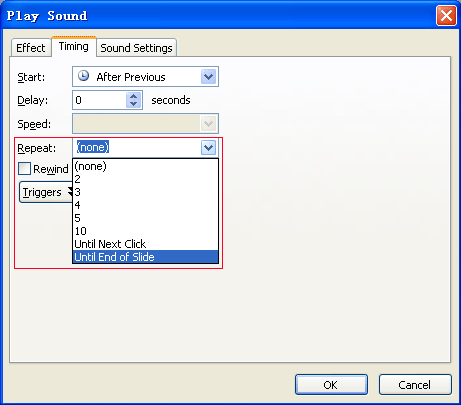
    • After click Effect Options, there would a window named Play Sound pop-up.
    • Find Stop playing and check After, and then specify a value bigger than the quantity of the slide quantity of the current PowerPoint file. In other words, if there are 10 slides contained in this PowerPoint file, you have to specify a value >10, 11 or 12.

    • Click Timing tab under the Play Sound window.
    • Find Repeat under this tab, click Drop-down button.
    • Choose the option of Until End of Slide.
    • Click OK button.

    The audio file is played as background music from the very beginning to the very end of the PowerPoint. To test the audio effect, click icon.

    With this function, I am sure that your PowerPoint file would be more amusing and thrilling.

    Related:

    PowerPoint to DVD PowerPoint to Video PowerPoint to FLV

    PowerPoint to DVD for Education PowerPoint to Video for Education

    PowerPoint for Web PowerPoint to PDF PowerPoint to DVD Burner

    Convert PowerPoint to Video PowerPoint to DVD Converter

    Monday, July 20, 2009

    Free PowerPoint Sound Clips

    Free PowerPoint Sound Clips

    You can download these PowerPoint sound clips to add into your Power Point presentations. They are available in either mp3 or wav format.

    We recommend that you use the mp3 format as the file size is smaller. For older versions of PowerPoint you will need to use the wav format.

    Coffee Break - the sound of a cappucino machine
    Coffee machine (mp3) 283k
    Coffee machine (wav) 780k

    Tea Break - the sound of a tea cup being stirred
    Tea Break (mp3) 67k
    Tea Break
    (wav) 183k

    Time for a beer - the delicious sound of a top being taken off a bottle of beer and poured into a glass
    Time for beer (mp3) 200k
    Time for beer
    (wav) 555k

    Champagne - treat yourself to a bottle of champage being opened and a few glasses poured out
    Champagne (mp3) 290k
    Champagne
    (wav) 830k

    Ting
    Ting (mp3) 45k
    Ting (wav) 122k

    Door bell
    Door bell (mp3) 24k
    Door bell
    (Wav) 64k

    Phone Ringing - an old fashioned telephone bell
    Phone ringing (mp3) 145k
    Phone ringing
    (wav) 423k

    Ships bell - a ships bell being struck twice
    Ships bell (mp3) 57k
    Ships bell (wav) 104k

    Morse code - a short extract of morse code - but can you tell what it means
    Morse code (wav) 75k
    Morse code (mp3) 10k

    Cell Phone - a short clip of a cell phone ringing.
    Cell phone (mp3) 77k
    Cell phone
    (wav) 836k

    Ringing tone - the sound you hear when you dial a phone number
    Ringing tone (wav) 412k
    Ringing tone (mp3) 149k

    Text message - the SMS message tone
    Text message (mp3) 38k
    Text message (wav) 101k

    Dial tone - the sound you hear when you pick up your phon handset
    Dial tone (mp3) 66k
    Dial tone
    (wav) 712k

    Drip drip drip - the sound of a droplet of water slowly dripping away
    Drip drip (mp3) 126k
    Drip drip
    (wav) 347k

    Ding dong - the sound you hear at the airport before they make an announcement - as well as a door bell noise
    Ding dong (mp3) 43k
    Ding dong
    (wav) 116k

    Tick tock - the sound of a clock ticking away
    Tick tock (mp3) 77k
    Tick tock
    (wav) 211k

    Touch Tones - the sound of a fax or a modem dialing a telephone number (also known as DTMF)
    Touch tones (mp3) 40k
    Touch tones
    (wav) 108k

    Snoring - the sounds of my friend Viv asleep on the sofa (he doesn't know about this recording - so please don't tell him)
    Snoring (mp3) 363k
    Snoring
    (wav) 1 MB

    The following templates have been supplied by Liz Oakley.

    These sound clips are only available in mp3 format

    Dog Barking - I don't know why, but this has been the most requested clip for us to produce - so here you are!
    Dog Barking (mp3) 12k

    Happy Birthday - a complete rendition of "Happy Birthday to you" - this is the world's most famous song
    Happy Birthday (mp3) 223k

    Wedding March - how romantic! - the sound of a bride walking down the wedding aisle
    Wedding March (mp3) 374k

    Car Horn - a car horn being beeped a couple of times
    Car Horn (mp3) 290k

    Wedding Bells - wedding bells at the church

    Wedding Bells (mp3) 332k
    Wedding Bells Long (mp3) 1788k

    We have been sent in a whole CD of free sound effects by Alan McKinney from Freesfx.co.uk

    With so many to choose from we have sifted through the sound effects and have selected those that we think are most appropriate to use in your presentations.

    You can find more sound effects on Alan's website.

    These sound effects are only available in wav format (but it has the advantage that you can embed them in PowerPoint).

    Shush!! - need to make the meeting room quiet. Just play them the shush sound effect.
    Shush (Wav) 31k

    Gasps - Another Eureka moment. The whole group stands back and gasps.
    Mixed group gasps (Wav) 48k

    Oh yes - Not quite Leslie Phillips but quite a posh voice having consumed too much Port Wine saying "Oh yes"..
    Oh yes (Wav) 36k

    Cartoon Voice ahh - For one of those Eureka moments. A posh sounding voice saying Ahh. Could work well in a quiz programme.
    Ahhh (Wav) 24k

    Gargle - Another good comedy one. The noise of a man having a good gargle.
    Gargle (Wav) 143k

    Boat Engine - The satisfying chugg of a boat engine.
    Boat engine
    (Wav) 401k

    Car Ignition - Time to get going. The sound effect of a car engine being started.
    Car Ignition (Wav) 290k

    Clock-Tick - An old clock marking the passage of time. Another one that is great for an "I must hurry" you quiz presentation.
    Clock-tick (Wav) 658k

    Drippy Rain - Sounds like it's going to be a wet day .
    Drippy Rain (Wav) 587k

    Dual Carriageway - Don't stand too close. The noise of cars roaring along the highway.
    Dual-Carriageway (Wav) 658k

    Rough sea - All adrift on a stormy night. This is a good sound effect if you want to tell one one of those shaggy dog stories.
    Rough sea (Wav) 36k

    Spitfre overhead - This one goes well with our Winston Churchill speech - Fight them on the beaches - the sound of a spifire flying overhead
    Spitfire overhead (Wav) 1,018k

    Toiler Flush - A great one for an anology about throwing money down the drain. The sound of your cash being flushed awya
    Toilet Flush (Wav) 2,874k

    Motorbike starting - Rearing to go. Here is a motorbike being started and revved up. In this case a Yamaha RD350. Oh happy memories.
    Motorbike starting (Wav) 1,459k

    Zip it up - Another comedy clip or one that could relate to packing things up at the end of a presentation.
    Zip (Wav) 19k

    Related:

    PowerPoint to DVD PowerPoint to Video PowerPoint to FLV

    PowerPoint to DVD for Education PowerPoint to Video for Education

    PowerPoint for Web PowerPoint to PDF PowerPoint to DVD Burner

    Convert PowerPoint to Video PowerPoint to DVD Converter